How I use email automation to onboard users and ask for reviews, with Resend
Branded sign-in emails, opt-in product news, and post-purchase emails that ask for a review on day 3 and for feedback on day 10. Here's how the email side of my apps runs on Resend, Supabase and scheduled Claude tasks.

Michal Wlosik
· 3 min read
Part of how I market my apps as a one-person team.
Email is the one channel I own outright. No algorithm decides who sees it, and it reaches people who already chose my product. For a solo builder it's also the easiest place to automate badly, by sending too much, too early, to people who never asked. So my setup is deliberately small: three kinds of email, each with a clear job.
The plumbing: one Resend team per product
Every product has its own Resend team with its own verified domain: Penlo, Bookbeam, Sidecue, Sift, Cubbie, Ectobuilder and Bruno. Mail from Sift comes from hello@siftphotos.pro, never from a generic address. Separate teams also mean a mistake in one product can't hurt the sending reputation of another.
Three things send through those accounts:
- Supabase Auth (sign-in links, password resets, confirmations) through Resend's SMTP.
- Ghost on each product site, for its own system emails.
- Claude, for the automated emails below, through Composio. More on why in the Composio post.
Replies come back too. Each product's hello@ inbox lives in Resend, and an hourly scheduled task forwards new mail to my Gmail with a [Product] prefix and the sender set as Reply-To. I answer from Gmail as that product's address, which sends through Resend too.
1. Onboarding: the emails nobody notices until they break
The first email a new user gets is a sign-in link or a confirmation code. Supabase's default templates work, but they look like they came from nowhere: generic subject lines, no logo, no product name. People hesitate to click those, and spam filters hesitate too.
So every product gets its own set: confirm sign-up, magic link, password reset, email change, invite and confirmation code, each with the product's logo, colour and a plain link as a backup. For Bruno, which has no screen to type a code into, the templates drop the code box entirely. Six of my Supabase projects now have fully branded templates; Penlo still has one default template left to replace.
2. Product news: opt-in, and nothing else
I want to tell users about new features. I also don't want to email people who didn't ask. In the EU that's not only polite, it's the law. So in Bookbeam and Sift:
- An unticked "Email me occasional tips and product news" checkbox at sign-up.
- A switch in Settings to turn it on or off later, for people who signed up before it existed.
- Consent stored with when and where it was given, and an unsubscribe link in every email.
- The privacy policy says all of this in plain words.
The honest status: the opt-in is live and the list is growing, but I haven't sent the first tips email yet. When I do, it'll explain one feature per email, the ones people don't find on their own, like Bookbeam's bilingual reading or Penlo's AI connector.
3. After a purchase: a review on day 3, a question on day 10
This is the automation I'm happiest with. When someone buys Sift Pro, they get exactly two emails:
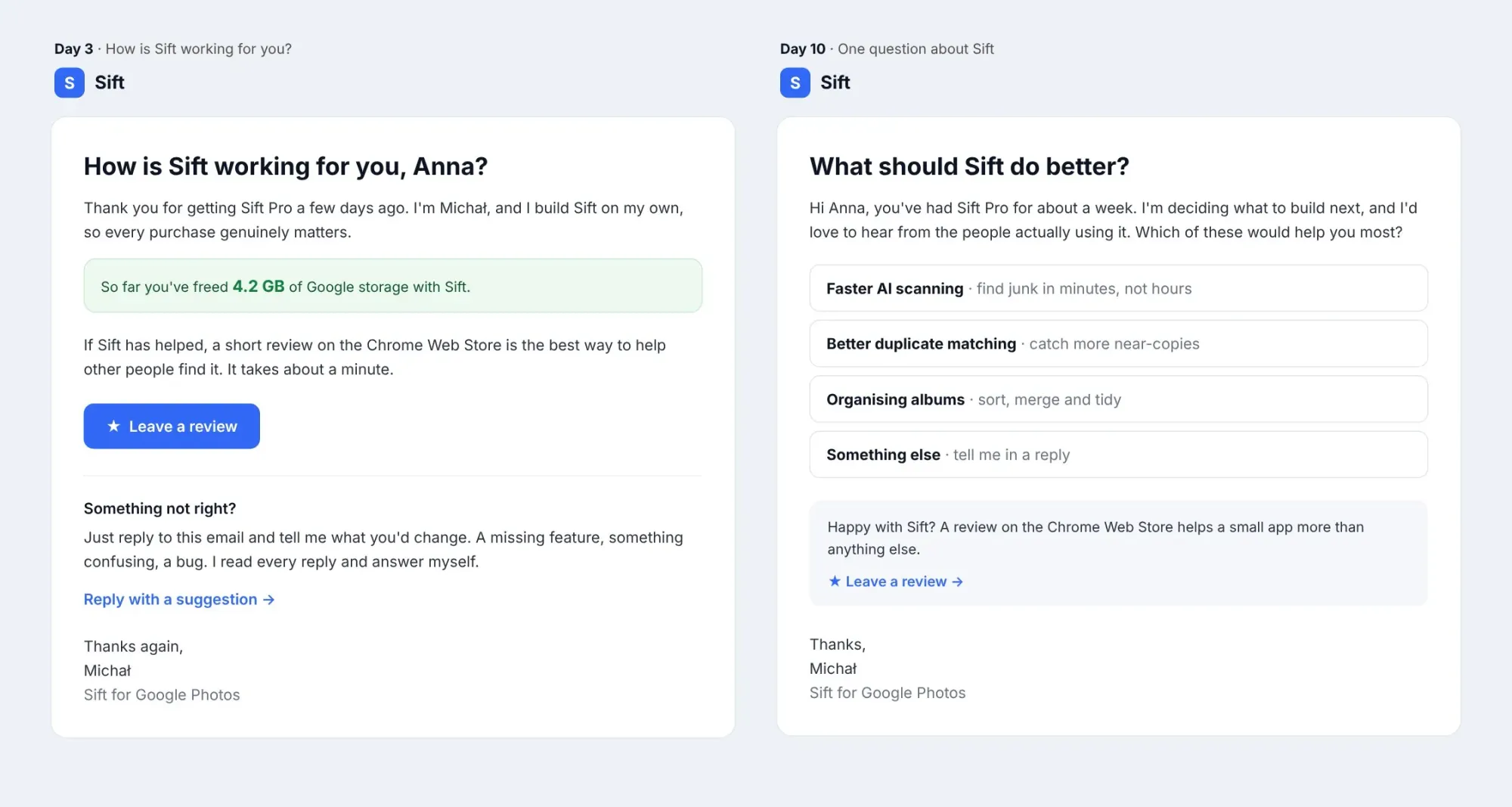
- Day 3, "How is Sift working for you?" A thank-you from me, how much Google storage they've freed with Sift, a "Leave a review" button that opens the Chrome Web Store, and an invitation to reply if something's wrong.
- Day 10, "One question about Sift". Four one-click options for what I should build next, each opening a pre-filled reply, and a smaller review link at the bottom.
How it runs:
- A daily scheduled Claude task reads paid orders from Polar.
- A database function in Supabase decides who is due. It skips $0 and refunded orders and anyone who unsubscribed, and never sends the same email twice. It fills in the first name and the storage figure. The storage box only appears when the buyer's email matches the Google account they use in Sift.
- Claude sends each email through Sift's Resend account and logs it.
The task can't improvise: the database picks the recipients and writes the content, and the task only delivers. That's deliberate. An AI should not be deciding who gets marketing email.
What I'd do differently
- Start with transactional email. Branded sign-in emails were the cheapest improvement I made, and every user sees them.
- Collect consent from day one. Adding an opt-in later means everyone who signed up before it can't be emailed.
- Make every email answerable. The day 10 question gets replies, and those replies are the best product research I have.
Written by
Builder, product marketer and AI enthusiast. I ship my own apps, like Sift (siftphotos.pro), Penlo (penlo.app), Ectobuilder (ectobuilder.com) and Cubbie (cubbie.pro), and write about building and marketing them with AI.
Keep reading
How I market my apps as a one-person team, with Claude as my marketing department
I build and market close to ten apps on my own. Here is the whole system: real numbers from Search Console, research in Ahrefs, product sites in Ectobuilder, store listings, email in Resend, payments in Polar, and Claude wiring it together.
How I launch a product site and blog in an afternoon with Ectobuilder
Every product I ship gets its own site and blog on Ghost, designed in Ectobuilder. Here's the setup, and how Claude edits, screenshots and writes for those sites through Ectobuilder's connector.
How I use Search Console, Ahrefs and Claude to plan content for Google and AI search
Claude reads Search Console for what's actually working and Ahrefs for what's worth writing next. Here's the loop I use to plan content for Google and for AI assistants, with real data from Penlo.