

Penlo has always handled the boring parts: pulling notebooks out of Dropbox, Google Drive, or OneDrive, running OCR on the handwriting, generating a short summary per notebook. The notes were searchable, the text was there — but you still had to know what to look for.

Penlo is the enhancement suite for your e-ink tablet. It reads your handwriting using AI, makes every note searchable, and sends your notes to Notion, Obsidian, or your email the moment you close a notebook.
Penlo AI adds a chat window to the dashboard. You ask a question. Penlo searches across all your notebooks — not just titles and summaries, but the full OCR text of every page — finds the passages that match, and hands them to an AI model to synthesize into an answer. The sources show up alongside the response: notebook name, page number, the exact excerpt that informed the reply.
If you've connected Penlo to Claude via MCP (covered in this guide), this covers the same use case without leaving the Penlo tab. For users on plans without MCP access, it's the same capability with no external setup required.
How it works under the hood
When you submit a question, Penlo converts it to a vector embedding and runs a similarity search against the embeddings stored for every OCR'd page in your library. The top-matching chunks are retrieved, combined with the original question, and sent to the model with a system prompt that scopes it strictly to your notes — it won't invent information or draw on general knowledge to fill gaps.
The result is grounded in what you wrote, not what the model thinks you might have meant.
A few things worth knowing:
- It only answers from notes that have finished OCR. Notebooks with a pending or failed OCR status aren't searched.
- Short follow-up questions ("expand on that", "what else?") automatically inherit context from the previous answer, so the retrieval step finds the right notebooks even without repeating the topic.
- If your question isn't about your notes — weather, general knowledge, anything off-topic — it says so rather than guessing.
What to actually ask it
The obvious use case is retrieval: you remember writing something, you can't remember where.
"What did I write about the Q2 pricing discussion?" "Did I note down any follow-up tasks from the meeting with [name]?" "Find every time I mentioned [project] across all notebooks."
It gets more useful past retrieval. Because the model can reason across multiple retrieved chunks in one response, you can ask synthesis questions that would take 20 minutes of manual digging:
"Summarize what I wrote about [topic] this month." "What objections came up in my sales call notes from last week?" "Pull every decision I wrote down in April."
And cross-notebook questions, which are the hardest to do manually:
"What ideas have I returned to more than once?" "Find every TODO across all notebooks." "Compare what I wrote about [topic] in two different notebooks."
What it looks like
The chat icon sits in the bottom-right corner of the dashboard — a small floating button. Clicking it opens a panel without leaving the notes view. The input field cycles through placeholder queries on a short timer to show new users what kinds of questions make sense:
- "What did I write about [topic] last week?"
- "Find my notes from the [meeting name] meeting."
- "What decisions did I make in March?"
How it differs from full-text search
Penlo already has keyword search — type a word, get every notebook that contains it. That still works and is still the fastest way to find something specific when you know the exact word you used.
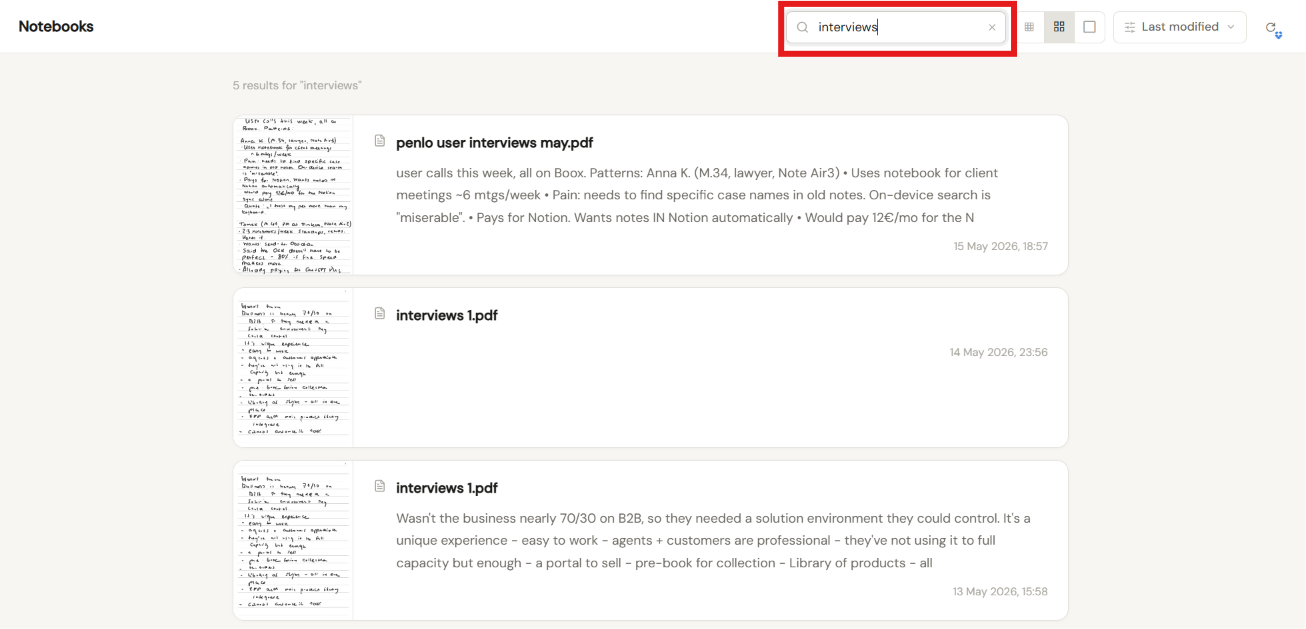
Penlo AI handles the case where you don't. You might have written "we can't charge more than they currently pay for Excel" — but you're searching for "pricing ceiling." Keyword search misses it. Semantic search finds it.
The two aren't competing. Keyword search is faster for known terms; the AI chat handles vague recollections, synthesis, and anything that involves connecting notes across multiple notebooks.
Availability
Penlo AI is available on all paid plans. The chat widget is on by default; there's nothing to configure. If you're already running OCR on your notebooks, your notes are already indexed and searchable through it.
Penlo is the enhancement suite for your e-ink tablet. It reads your handwriting using AI, makes every note searchable, and sends your notes to Notion, Obsidian, or your email the moment you close a notebook.
If you're new to Penlo, the short version: it watches whatever cloud folder your e-ink tablet syncs to, transcribes your handwriting automatically, and now lets you ask questions about what you've written. The longer version is in these two posts:


