

The seconds stretch out. You hear yourself say "that's a great question" to buy time. You feel the heat creep up the back of your neck. You start talking, but the words are tangled, and you can't find the thread, and the specific project you wanted to mention – the one with the 40% efficiency gain, the one that would have been perfect here – is simply gone, as if it never existed.
You're not unintelligent. You're not unprepared. You're human, under pressure, with everything on the line.
That moment – that particular species of failure – is what Sidecue was built to prevent.
The broken funnel nobody talks about
Before we even get to the interview room, let's talk about what it takes to get there.
The modern job application process is, for most people, a study in statistical despair. The average corporate job posting receives somewhere between 100 and 250 applications. For roles at well-known companies or in competitive fields, that number can climb into the thousands. And the vast majority of those applications are never read by a human being.
Applicant Tracking Systems – ATS – act as the first filter. They scan CVs for keywords, format compliance, and signals that may have nothing to do with your actual ability to do the job. You've probably seen the statistic floating around that 75% of resumes are rejected by ATS before a human ever reads them. It turns out it's almost certainly fabricated – a number that got laundered through enough career advice blogs to feel like established fact, with no credible source behind it. But here's the thing: the myth spread so easily because it feels true.
The experience of applying into a void, of sending out dozens of tailored applications and hearing nothing, is near-universal. The real numbers are harder to pin down, but the underlying reality isn't – a huge proportion of applications are filtered, deprioritised, or simply never meaningfully reviewed. Whether the exact figure is 75% or 45% or something else entirely, the felt experience of the modern job search is one of near-total opacity.
For those who do make it through – who beat the algorithm, get the email, schedule the call – the stakes of that conversation are almost absurdly high. One 45-minute interaction is supposed to represent the sum total of your skills, your experience, your personality, and your potential. You get one shot. There are no retakes.
And here's the part that rarely gets acknowledged: the ability to perform well in a job interview is itself a skill – one that correlates only loosely with the ability to actually do the job. Extroverts tend to do better. People who've had more interview practice do better. People who aren't anxious, aren't exhausted from three months of job searching, aren't supporting a family on a ticking clock – they do better too.
The playing field is not level. It never has been.
What is Sidecue, exactly?
Sidecue is a Chrome extension that sits silently in your browser's sidebar during a remote interview – on Google Meet, Zoom Web, Microsoft Teams, or any other browser-based meeting platform – and acts as a real-time AI co-pilot.
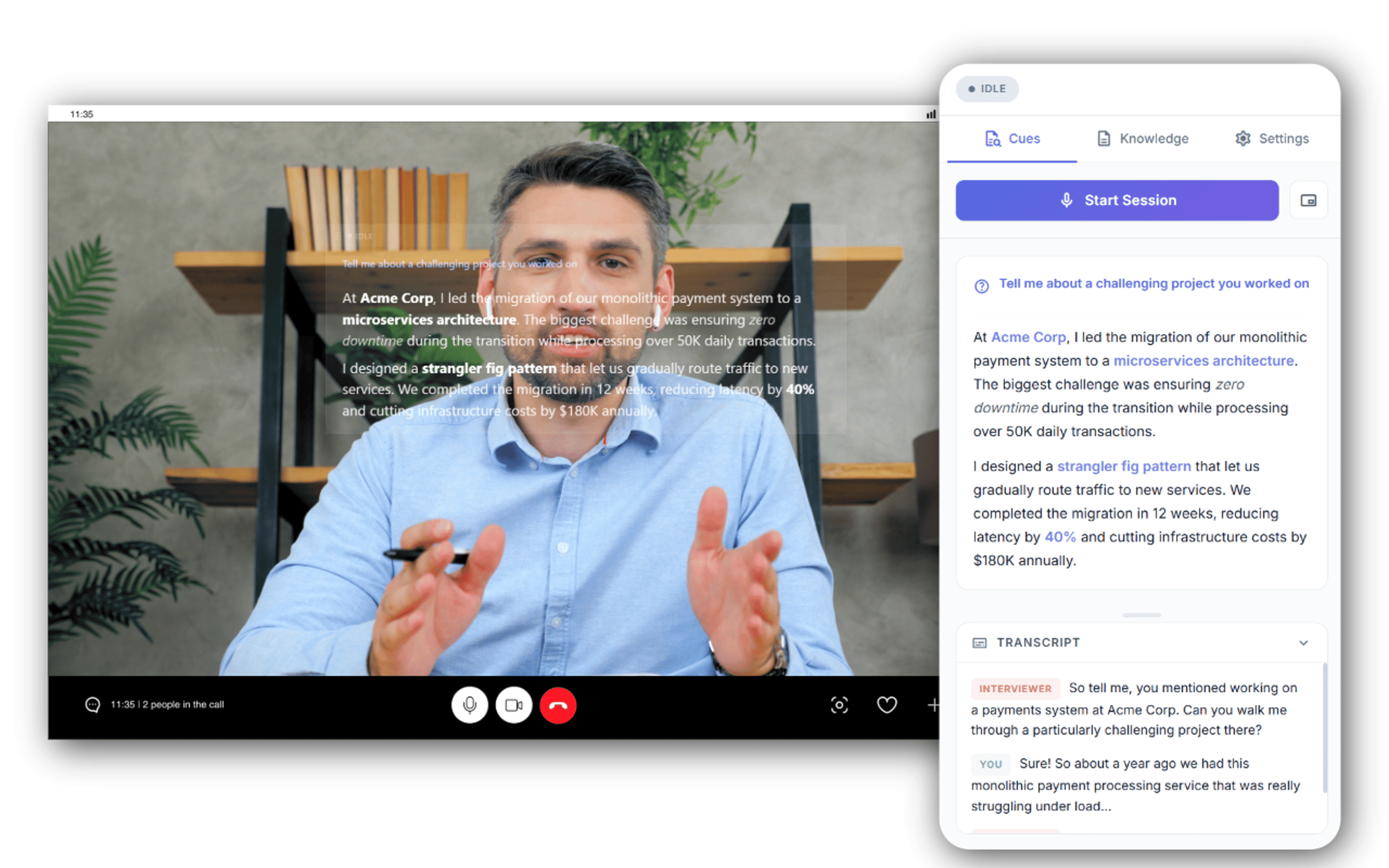
Here's what it actually does, step by step:
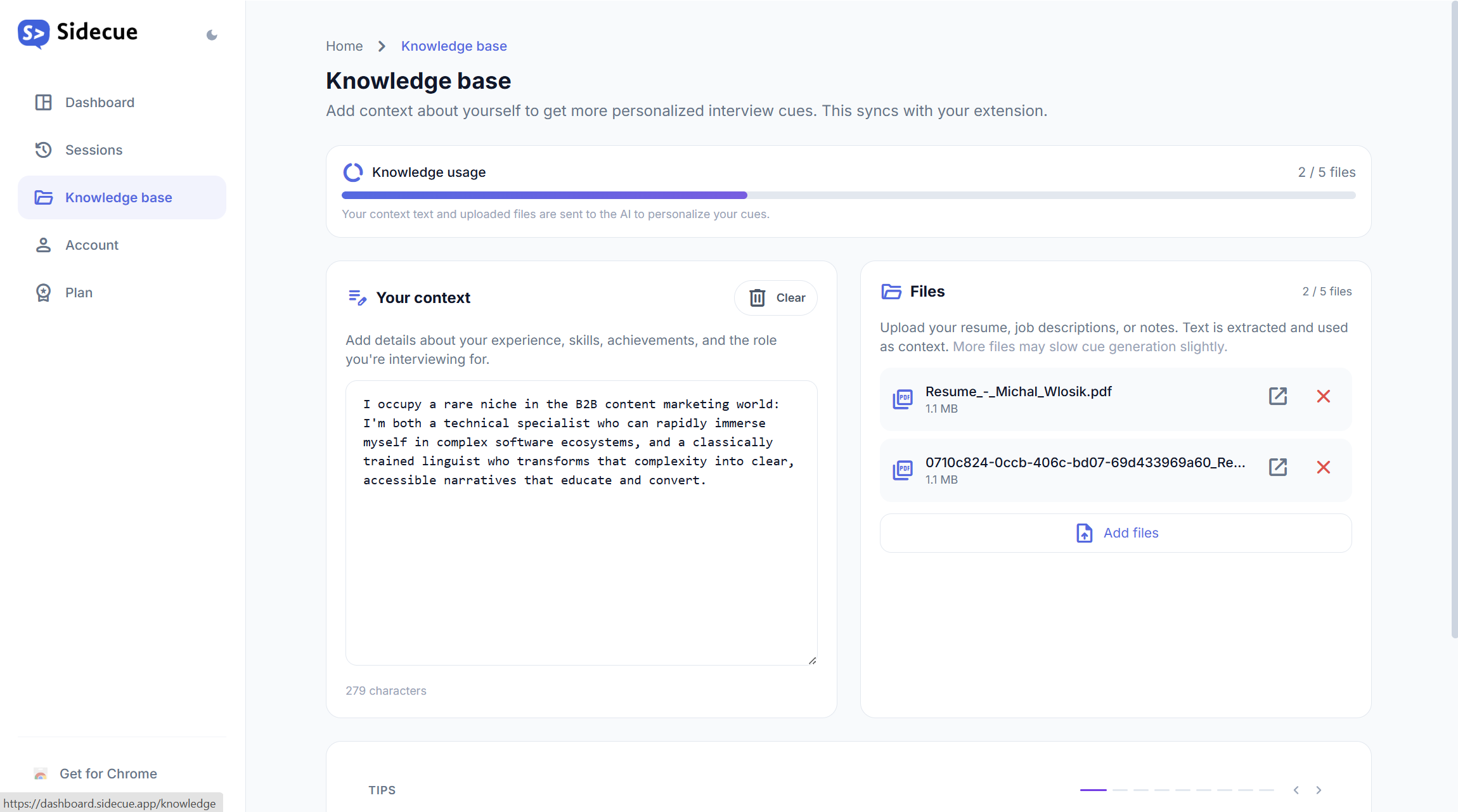
You load it up before the call. You paste in your resume, the job description, notes about the company, specific projects or achievements you want to highlight – whatever context is relevant. This becomes Sidecue's knowledge base for the session.
- When the interview starts, Sidecue begins listening. It captures two audio streams simultaneously: the tab audio (your interviewer's voice coming through the meeting platform) and your microphone. Both are transcribed in real time.
- When the interviewer finishes a question – detected through a short silence window after their speech – Sidecue sends that question to an AI model along with the full conversation transcript and your loaded context. Within seconds, a cue card appears in the sidebar: a short, structured set of bullet points tailored specifically to you and this question, drawing on your actual experience and background.
- You glance at the cue. You see: "🚀 Led migration to microservices – reduced deployment time by 60%. 🤝 Cross-functional team of 8 engineers. 📊 Talk about the monitoring challenge." You speak naturally, in your own words, using those anchors as a guide. The cue doesn't put words in your mouth – it reminds you of words you already know.
The interviewer sees none of this. The sidebar is yours alone.
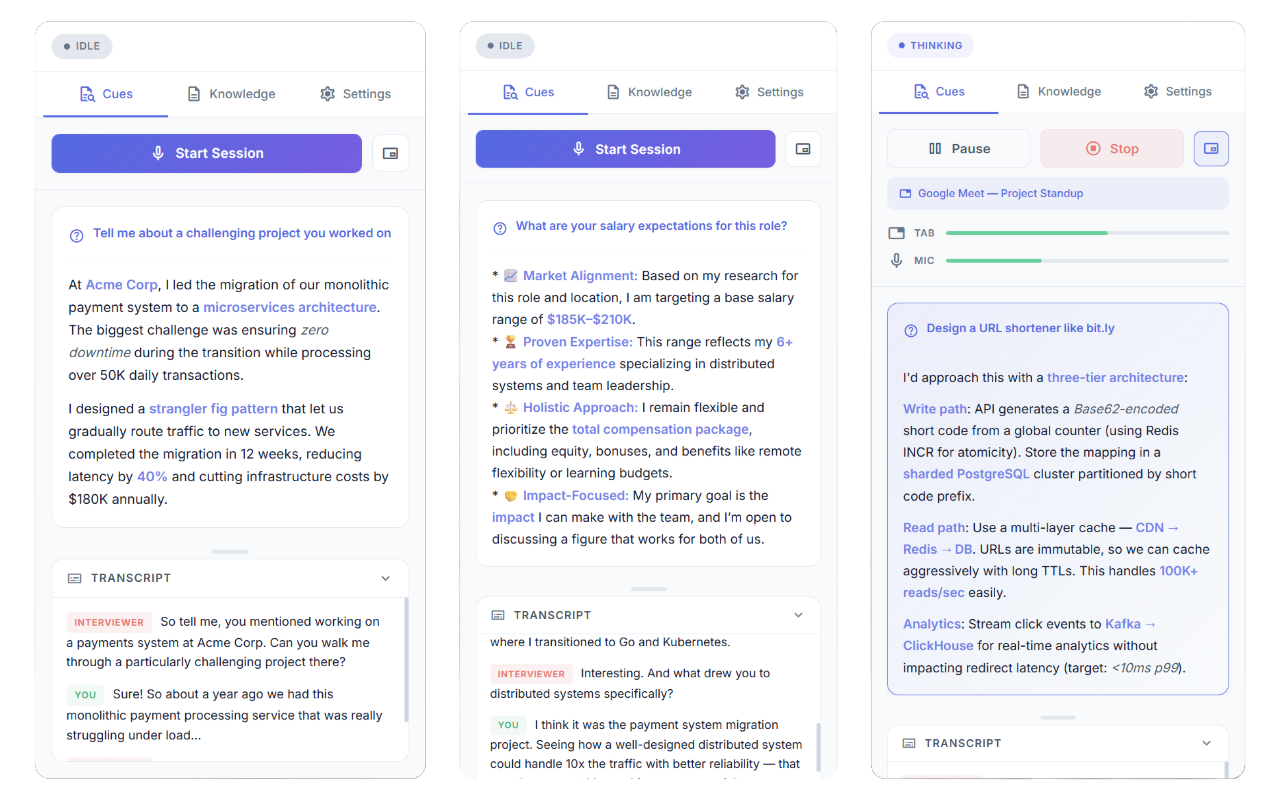
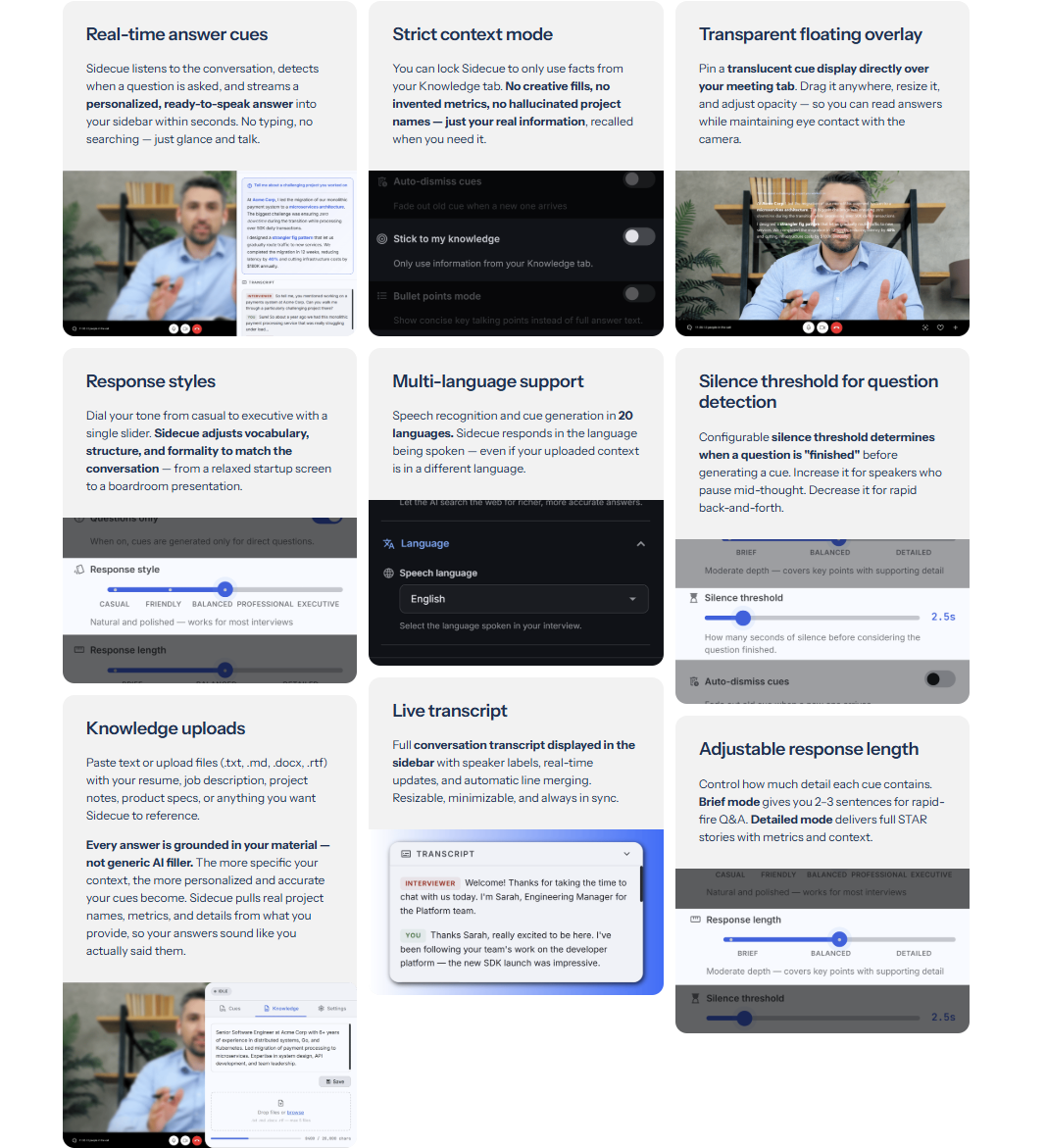
There's also an optional floating overlay mode – a transparent text layer that appears directly over the meeting window, so you don't need to look away from the video at all. It's completely invisible to others on the call.


Sidecue - The silent meeting and interview co-pilot
Free trial · Chrome Web Store · Works on Meet, Zoom & Teams
Under the hood: the architecture
For the technically curious, Sidecue is built on a stack of modern AI APIs wired together in a Chrome extension architecture. Let me walk through how it actually works.
The toolkit at a glance:
- Deepgram Nova-2 – real-time speech-to-text over WebSocket, dual-channel (tab audio + mic)
- Google Gemini 2.5 Flash Lite – fast, streaming LLM for cue generation
- Supabase – auth, database, Edge Functions as secure API proxy, remote prompt config
- Chrome Extension APIs –
tabCapture,getUserMedia, Side Panel, optional content-script overlay - A light user dashboard deployed to Vercel
Dual audio capture
Chrome's tabCapture API gives the extension access to the audio playing in the active browser tab – in this case, the interviewer's voice coming through the meeting platform. Simultaneously, the browser's standard getUserMedia API captures the user's microphone. Both streams are processed independently, which means the system knows at all times who is speaking.
Real-time speech-to-text with Deepgram
Both audio streams are sent via WebSocket to Deepgram, one of the leading real-time speech recognition APIs. Deepgram's Nova-2 model transcribes speech with low latency and high accuracy across multiple languages and accents. The key here is that it's streaming – words appear in the transcript as they're spoken, not after a delay.
The system tracks which audio channel is active at any given moment. When the interviewer's channel goes quiet – after a configurable silence window of around 2-3 seconds – Sidecue interprets this as the end of a question and triggers the cue generation process.
Question detection with debounce
This is one of the subtler engineering challenges. People don't speak in clean, discrete blocks – they pause mid-sentence, restart thoughts, talk over each other. A naive approach would trigger a cue after every brief pause, flooding the user with half-baked responses.
Sidecue uses a debounce mechanism: each new burst of speech from the interviewer's channel resets the silence timer. Only once the interviewer has been genuinely quiet for the threshold period does the system fire. And if the interviewer starts speaking again while a cue is being generated, the in-flight generation is cancelled and the cycle restarts. The result is that cues only appear when a complete thought has been expressed.
Gemini Flash for cue generation
When a question is detected, the system sends a prompt to Google Gemini (using the Flash model for speed) containing three things: the system prompt defining Sidecue's role, the user's uploaded context (resume, job description, meeting notes), and the full conversation transcript so far – with the most recent interviewer speech highlighted as the active question.
Gemini's response streams back token by token, which means the cue starts appearing in the sidebar within a second or two of the question being asked. The prompt is carefully engineered to produce short, scannable bullet points – not paragraphs. Each point is prefixed with a contextually relevant emoji to make it instantly visually parseable.
The system prompt itself is stored in Supabase rather than hardcoded in the extension. This is a deliberate design choice: it means the prompt can be tuned, updated, or A/B tested without pushing a new version to the Chrome Web Store (which can take days to approve).
Supabase for backend infrastructure
Supabase serves as the entire backend infrastructure for the product side of Sidecue. It handles:
- Authentication – Email/password and OAuth login, with the session JWT stored in Chrome's local extension storage
- User profiles and subscription state – Plan type, trial minutes remaining, usage logs
- Edge Functions as API proxy – The extension never holds master API keys. Instead, it authenticates with Supabase, and all calls to Deepgram and Gemini are proxied through Supabase Edge Functions (serverless Deno functions). These functions validate the user's JWT, check their plan status and quota, then make the actual API call with server-side secrets. This means no API key is ever shipped inside the extension code
- Remote configuration – The system prompt and other configurable parameters live in the database, allowing live updates
For Deepgram specifically, the proxy uses Deepgram's temporary key API: rather than proxying a persistent WebSocket (which Supabase Edge Functions don't natively support for long-lived connections), the Edge Function mints a short-lived, scoped Deepgram key per session. The extension uses that ephemeral key to connect directly to Deepgram. If the key is somehow extracted, it expires automatically.
A note on privacy
A tool that listens to your conversations deserves a straight answer about what it does with the data.
- Audio is never stored. Both streams -- tab and microphone -- are processed in real time and discarded. No recording, no audio file, ever.
- Transcripts and cues are saved to your account. At the end of each session, the full conversation transcript and the cues generated are stored in your dashboard. This is a feature, not a side effect -- you can review what was said and what Sidecue suggested after the fact. You can delete individual sessions or your entire account at any time.
- Your resume and notes are stored server-side. Meeting Knowledge -- your resume, job description, uploaded files -- is synced to Supabase Storage under your account so it's available across devices and sessions. You can edit or delete it at any time from the extension or the web dashboard.
- Usage data is metered, not profiled. Session duration is recorded to track your plan quota. The platform (Google Meet, Zoom, etc.) is logged as session metadata. Nothing else about your behaviour is tracked.
- Data is stored on Supabase, not on proprietary servers. Supabase is built on PostgreSQL and hosted on AWS, with row-level security enforced at the database layer -- meaning your data is only ever accessible to your own account, not to other users or Sidecue's team in any bulk form. Supabase is SOC 2 compliant and widely used as backend infrastructure across thousands of production applications.
- No API keys in the extension. All calls to Deepgram and Gemini are proxied server-side. The AI services never receive a persistent identifier tied to you.
One honest caveat: Sidecue transiently processes the voices of everyone on the call – not just yours. Audio is never stored, but it is heard. If you're in a jurisdiction with two-party or all-party consent laws, that's worth knowing before you use it in a live meeting.
The elephant in the room: ethics
Let's address this directly, because it's the first thing most people think when they hear about a product like this.
Is using Sidecue cheating?
What Sidecue actually does: It listens to a question, then surfaces structured bullet points drawn from the user's own background – experience they actually have, projects they actually built, skills they actually possess. It doesn't fabricate credentials. It doesn't generate fictional achievements. It doesn't answer on the user's behalf. It's a memory aid and a structuring tool. The user still has to understand the cue, still has to speak coherently, still has to demonstrate knowledge when pressed for depth.
What Sidecue doesn't do: It can't help someone claim expertise they don't have. If a candidate has the cue "talk about your experience with distributed systems" but actually has none, they'll be exposed the moment any follow-up question goes more than one level deep. Sidecue has no capacity to fake competence – it can only help you express the competence you already have.
And you control exactly how much it helps. Sidecue has a "stick to your knowledge" setting that locks cue generation strictly to the context you've uploaded – your resume, your notes, your experience. When this is on, the AI won't reach beyond what you've explicitly provided. No general knowledge, no filled-in gaps, no elaboration beyond your own words. For users who want the memory-aid benefit without any risk of the tool overreaching, this is the setting to use. How fair you want to be is entirely your call.
Now consider the tools we already consider acceptable in professional contexts. Politicians use teleprompters. Executives use briefing documents before board meetings. Lawyers use notes during depositions. Surgeons consult reference materials mid-procedure. Presenters use speaker notes. In almost every high-stakes professional context, some form of external aid is not only tolerated but expected – because the goal is the outcome, not the unaided performance.
Job interviews are one of the few high-stakes professional situations where we've collectively decided that aids are forbidden, and yet the "skill" being tested – performing well under conversational pressure – is not actually the skill required by the job.
There's also a genuine equity argument here. Interview anxiety is real, and it disproportionately affects people with social anxiety, ADHD, autism spectrum conditions, and anyone for whom the interview format is culturally unfamiliar. Non-native speakers operating in a second or third language face a particular disadvantage – not because they lack the skills for the role, but because they're simultaneously managing language and performance anxiety. Sidecue provides a level of support that partially compensates for these structural disadvantages.
The honest boundary, as I see it, is this: Sidecue is a tool for performing closer to your actual level. It's not a tool for performing above your level in ways you cannot sustain once hired. If someone uses it to bluff their way into a role they genuinely cannot do, the consequence lands on them quickly – and on no one else. But if it helps a brilliant engineer who freezes under pressure land a role where they'll thrive, that's a net positive for everyone.
The ethics of any tool depend on the intent and the context. A knife is a kitchen utensil or a weapon. The question isn't whether the technology exists – it's whether you use it to bridge a legitimate gap or to manufacture a false one.
Use cases beyond the interview room
While the job interview use case is where Sidecue shines most clearly, the underlying technology is general-purpose. Any situation where you're in a live conversation and want to be able to recall or structure information in real time is a candidate.
- Sales and discovery calls are an obvious adjacent use case. Sales reps can load Sidecue with product specs, pricing tiers, competitive comparison sheets, and objection-handling playbooks. When a prospect raises a concern, Sidecue surfaces the relevant response – not a script, but the key points to address. For account executives managing complex enterprise deals with many variables, this can meaningfully reduce the cognitive load of live calls.
- Stakeholder and client meetings are another strong fit. Consultants, project managers, and agency leads often go into meetings carrying a lot of context – previous decisions, open questions, technical constraints. Sidecue lets you load that context beforehand and have it instantly accessible when a stakeholder asks "wait, what was the status of the API integration?"
- Academic defenses and oral examinations present a compelling use case, particularly for PhD candidates or anyone defending research. Loading a thesis abstract, key citations, and methodology notes into Sidecue means the candidate can be prompted toward the right chapter, the right dataset, the right citation when a committee member asks a specific question.
- Non-native language support is worth highlighting specifically. Sidecue responds in the language of the conversation. For someone navigating a professional conversation in their second language, having a sidebar that structures responses in that same language – drawing on the vocabulary and framing of the job description they uploaded – is a genuine accessibility feature.
- On-camera content creation was the original teleprompter inspiration. Creators recording video in the browser can use Sidecue as a smart content guide – load a topic outline, and let Sidecue surface talking points as the conversation or interview develops, rather than staring at a static script.
Try it
Sidecue is live on the Chrome Web Store, with a free trial and paid subscription tiers. Install it, load your resume, and see what it feels like to walk into an interview knowing you have everything you need right there in your sidebar.
Sidecue - The silent meeting and interview co-pilot
Free trial · Chrome Web Store · Works on Meet, Zoom & Teams
If you're in an active job search, if you've ever blanked in an interview, if you're a non-native speaker navigating a high-stakes conversation in a second language – I'd love for you to try it.
Because you've already done the hard part. You got the interview. You deserve a fair shot at the conversation.


